Exact 3024 × 4032 (3:4) size
Ray-Ban Meta glasses shoot 12MP portrait photos at 3024×4032. The converter fits your photo to that exact size, so Instagram treats it like a photo from the glasses.
The #1 free Meta glass photo converter & Ray-Ban Meta glasses converter. Convert any photo or video to authentic Ray-Ban Meta smart glasses format (3024×4032 3:4 EXIF & QuickTime atoms) to upload gyro stories without Meta glasses and unlock 3D Spin View on Instagram.
Important notice: Video conversion is currently in active beta testing and might not work on all devices or Android versions due to platform re-encoding.
Real photo tagged "AI info" on Instagram, Facebook or Threads? Drop it below to see which C2PA, IPTC, XMP or EXIF fields trigger the label, then save a clean copy. Pixels are not re-encoded and nothing is uploaded.
What no metadata tool can remove
Invisible pixel watermarks such as Google SynthID and Meta Video Seal, Meta's own image classifiers, and the "AI info" self-disclosure toggle you set when posting. Cleaning also does nothing to a post that is already live.
Next: upload this clean copy as a new post. The old post keeps its label, so delete and re-upload if you need it gone.
Use this to fix wrongly labeled real photos and to clean private metadata. Content that was actually AI-generated should still be disclosed, as Meta's policy requires.
Removes C2PA Content Credentials, IPTC DigitalSourceType and AI tool names. It cannot remove invisible watermarks like SynthID or change a post that is already live. Full guide & FAQ →
Takes less than 15 seconds. No special apps or hardware required.
Select any photo in FreeImGen AI and tap Share to Instagram or Download Photo to save it directly to your Photos / Camera Roll.
Open Instagram, swipe right to create a new Story, and pick the converted photo from your Camera Roll (avoid screenshots).
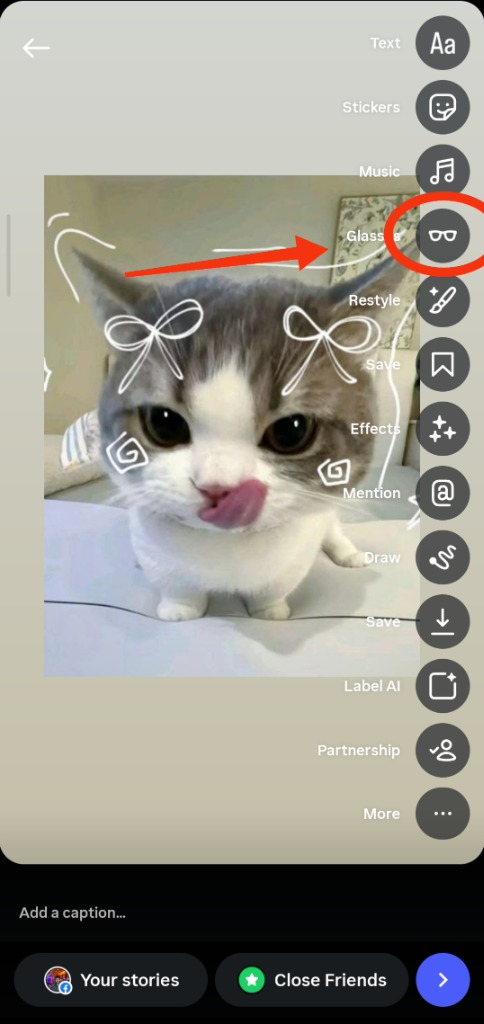
Look for the Glasses icon on the right sidebar tool menu. Tap it to enable the 3D Ray-Ban model, then tilt to spin!
When you select your converted photo or video in Instagram Stories, Instagram verifies the Ray-Ban Meta wearable metadata and automatically activates the hidden [[Glasses]] button on the right-hand sidebar menu.
Find the Circled Glasses Icon: Look at the right toolbar in the story editor. Between Music (♫) and Restyle (🖌️), you will see the official Glasses (🕶️) button appear (as circled in red on the screenshot).
Tap to Activate: Tap the Glasses icon once to attach the official 3D Ray-Ban smart glasses overlay to your Story.
Tilt to Spin in 3D: Instagram uses your device gyroscope so the 3D sunglasses rotate and pan across the POV scene in real-time as you tilt your phone!
Follow these 3 simple rules to guarantee the 3D sticker appears on your Story:
Always upload the original converted file directly from your device photos app.
Taking a screenshot strips all camera tags. Always save the actual converted JPEG.
Messaging apps compress images and erase the Ray-Ban Meta tags needed by Instagram.
Quick answers about Ray-Ban Meta Stories, privacy and the AI info label
It turns any photo into the format Ray-Ban Meta glasses produce: a 3024×4032 (3:4) portrait image with Ray-Ban Meta camera EXIF tags (Make: Meta, 12MP, f/2.2). Instagram Stories reads those tags and shows the Glasses option, which adds the 3D spinning glasses sticker and Spin View.
Choose or drop a JPG, PNG or WebP photo in the converter above, pick a frame (Wayfarer, Headliner or Skyler) and tap Download Photo or Share to Instagram. The photo is resized to 3024×4032 and tagged on your device, then saved to your Camera Roll.
Open Instagram, start a new Story and pick the converted photo from your Camera Roll. Tap the Glasses icon in the right-hand toolbar, then tilt your phone to spin the 3D glasses and pan the scene.
Upload the converted file straight from your Camera Roll. Screenshots, and photos sent through WhatsApp or Telegram, lose the camera tags Instagram looks for. On mobile, save with "Save Image" in the Share Sheet so the tags are kept.
Yes, the Video Converter (beta) creates a 9:16 MOV with Meta glasses metadata. Video currently works on iPhone only, because Instagram for Android re-encodes video and drops the tag. On Android, post a converted photo instead.
Open the AI Label Remover tab in the converter. It shows the C2PA, IPTC, XMP or EXIF fields that make Instagram, Facebook and Threads add "AI info", and saves a clean copy without re-encoding. It cannot remove invisible watermarks or change a post that is already live.
It is free and nothing is uploaded. All processing runs in your browser on your own device, so your photos and videos never reach a server.
Yes. It runs in Safari, Chrome, Edge and Firefox. Use your camera or gallery on a phone, or drag and drop files on a Mac or PC.
Instagram Stories only shows the Glasses option for photos it thinks came from Ray-Ban Meta glasses. It checks the image size and the camera tags in the file. This converter gives any photo those same details, on your own device.
Ray-Ban Meta glasses shoot 12MP portrait photos at 3024×4032. The converter fits your photo to that exact size, so Instagram treats it like a photo from the glasses.
It writes the EXIF tags the glasses add (Make: Meta, Ray-Ban Meta model, 12MP f/2.2 lens) for the Wayfarer, Headliner or Skyler frame you pick.
Everything runs in your browser. Your photos are never uploaded, and there is no sign-up or watermark.
| Feature | Phone photo | Converted here | Ray-Ban Meta |
|---|---|---|---|
| 3D glasses sticker on Stories | No | Yes | Yes |
| 3024 × 4032 (3:4) size | Varies | Yes | Yes |
| Ray-Ban Meta camera tags | No | Yes | Yes |
| Works with any photo or camera | Yes | Yes | Glasses only |
| Cost | Free | Free | $299+ |
Real photo tagged "AI info" on Instagram, Facebook or Threads? Find the C2PA, IPTC and XMP fields behind it and save a clean copy. Works on photos and videos.
Remove AI info →Save public Suno songs as 320kbps MP3 with cover art or as WAV, or cut a ringtone. Guides: download Suno songs, MP3 vs WAV, ringtones.
Open Suno Downloader →