Meta AI Glass Photo Converter
3024 × 4032 (3:4) Aspect Ratio Tool
The premier Meta AI glass photo converter and sensor normalization tool. Ray-Ban Meta Gen 2 smart glasses record in an authentic 3:4 vertical portrait ratio (3024 × 4032 pixels, 12.2 MP). Convert any phone photo, DSLR picture, or digital artwork to genuine Meta AI glasses dimensions and EXIF metadata instantly.
Convert Photo to 3024 × 4032 (3:4) Online
Upload or drop your photo below to automatically resize and inject genuine Meta AI smart glasses EXIF metadata.
Important notice: Video conversion is currently in active beta testing and might not work on all devices or Android versions due to platform re-encoding.
Real photo tagged "AI info" on Instagram, Facebook or Threads? Drop it below to see which C2PA, IPTC, XMP or EXIF fields trigger the label, then save a clean copy. Pixels are not re-encoded and nothing is uploaded.
AI info label detector and remover
What we found
What no metadata tool can remove
Invisible pixel watermarks such as Google SynthID and Meta Video Seal, Meta's own image classifiers, and the "AI info" self-disclosure toggle you set when posting. Cleaning also does nothing to a post that is already live.
Next: upload this clean copy as a new post. The old post keeps its label, so delete and re-upload if you need it gone.
Use this to fix wrongly labeled real photos and to clean private metadata. Content that was actually AI-generated should still be disclosed, as Meta's policy requires.
Removes C2PA Content Credentials, IPTC DigitalSourceType and AI tool names. It cannot remove invisible watermarks like SynthID or change a post that is already live. Full guide & FAQ →
Comparing Aspect Ratios: Phone vs. Wearable
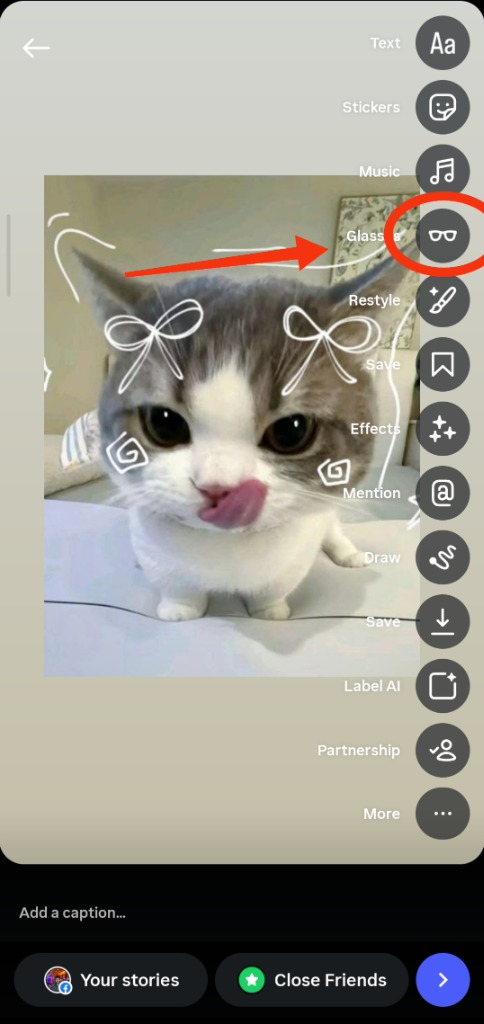
See why Instagram requires 3024×4032 to unlock official smart glasses stickers and Spin View.
Narrow field of view, no wearable tags.
Unlocks 3D Gyro Spin & Glasses Icon.
Horizontal landscape, cropped by Story.
Official Ray-Ban Meta Gen 2 Optical Specifications
Need the 1440×1920 (9:16) Video Aspect Ratio?
Ray-Ban Meta smart glasses record video in an upright 9:16 vertical orientation with QuickTime atoms. Use our free Video Converter to reframe and tag your clips.
Aspect Ratio FAQs
Common questions about resolution conversion and image cropping.
Q1 How do I use this Meta AI glass photo converter?
Simply drop or select any photo (JPG, PNG, WebP) into the online converter. FreeImGen AI automatically centers and normalizes your image to 3024×4032 (3:4 portrait) and injects genuine Ray-Ban Meta Gen 2 camera EXIF metadata, unlocking the 3D gyro spin sticker and glasses badge on Instagram Stories.
Q2 How does this Meta glasses image converter work?
Our image to Meta glass converter takes any digital photo (JPG, PNG, WebP) and rescales or crops it onto an uncompressed 3024×4032 (3:4) canvas. It preserves optical sharpness while aligning your image with Ray-Ban Meta Gen 2 ultra-wide sensor dimensions.
Q3 How does the Meta AI glasses converter format photos for Instagram?
The Meta AI glasses converter rescales any image to the exact 3024×4032 3:4 portrait resolution used by Ray-Ban Meta Gen 2 smart glasses and injects verified camera EXIF metadata, unlocking the 3D gyro spin sticker and Glasses badge on Instagram Stories.
Q4 Does this Meta AI converter work on both iPhone and Android?
Yes, FreeImGen AI operates 100% inside your web browser on iOS Safari, Android Chrome, and desktop browsers with zero app installation and zero server uploads.
Q5 Why do Ray-Ban Meta smart glasses use 3024 × 4032 (3:4) aspect ratio?
Ray-Ban Meta Gen 2 glasses house a physical 12-megapixel ultra-wide image sensor oriented vertically in the left temple hinge. Its native unbinned capture resolution is exactly 3024 pixels wide by 4032 pixels high (a 3:4 aspect ratio). This vertical framing captures natural head-height point-of-view perspective optimized for mobile feeds, Instagram Stories, and Reels.
Q6 How does 3:4 differ from standard 9:16 smartphone Stories?
Standard smartphone stories are 9:16 (1080×1920 or 2160×3840), which is narrower. The 3:4 ratio provides wider horizontal peripheral vision (capturing hands, surroundings, and wider scenes) without sacrificing vertical coverage.
Q7 Will FreeImGen AI stretch or distort my image during conversion?
No. FreeImGen AI automatically centers and normalizes your photo onto a crisp 3024×4032 canvas with smart cropping, preserving original sharpness, optical ratios, and pixel fidelity.
Q8 Can I batch convert multiple photos to 3024×4032 at once?
Yes. You can drag and drop multiple images simultaneously into FreeImGen AI Studio. Every file will be normalized to 3024×4032 and packaged into a convenient ZIP archive.
Need Full Story Simulation or Video Tools?
Explore the full 3D Gyro Story simulator, preset frame configurations, and 9:16 vertical video processing on the main studio.
Open Meta Glass Photo Converter Studio