Oakley Meta Vanguard & HSTN
3K POV & 12MP EXIF Converter
The world's first dedicated Oakley Meta photo converter and 3K POV video EXIF injector. Oakley Meta Vanguard features a centered 12MP 122° ultra-wide sensor positioned directly on the nose bridge with 3K UHD capture, while Oakley Meta HSTN delivers a 100° lifestyle FOV. Convert standard phone captures, action-cam shots, or DSLR photos into authentic Oakley Meta hardware streams with verified Stella namespaces to unlock the official Glasses (👓) story icon and 3D Gyro Spin View on Instagram.
Convert Photo or Video to Oakley Meta Format
100% in-browser client-side conversion. Zero file uploads, zero privacy risk, instant camera roll export.
Important notice: Video conversion is currently in active beta testing and might not work on all devices or Android versions due to platform re-encoding.
Real photo tagged "AI info" on Instagram, Facebook or Threads? Drop it below to see which C2PA, IPTC, XMP or EXIF fields trigger the label, then save a clean copy. Pixels are not re-encoded and nothing is uploaded.
AI info label detector and remover
What we found
What no metadata tool can remove
Invisible pixel watermarks such as Google SynthID and Meta Video Seal, Meta's own image classifiers, and the "AI info" self-disclosure toggle you set when posting. Cleaning also does nothing to a post that is already live.
Next: upload this clean copy as a new post. The old post keeps its label, so delete and re-upload if you need it gone.
Use this to fix wrongly labeled real photos and to clean private metadata. Content that was actually AI-generated should still be disclosed, as Meta's policy requires.
Removes C2PA Content Credentials, IPTC DigitalSourceType and AI tool names. It cannot remove invisible watermarks like SynthID or change a post that is already live. Full guide & FAQ →
How to Get the Oakley Meta Vanguard Instagram Story Icon
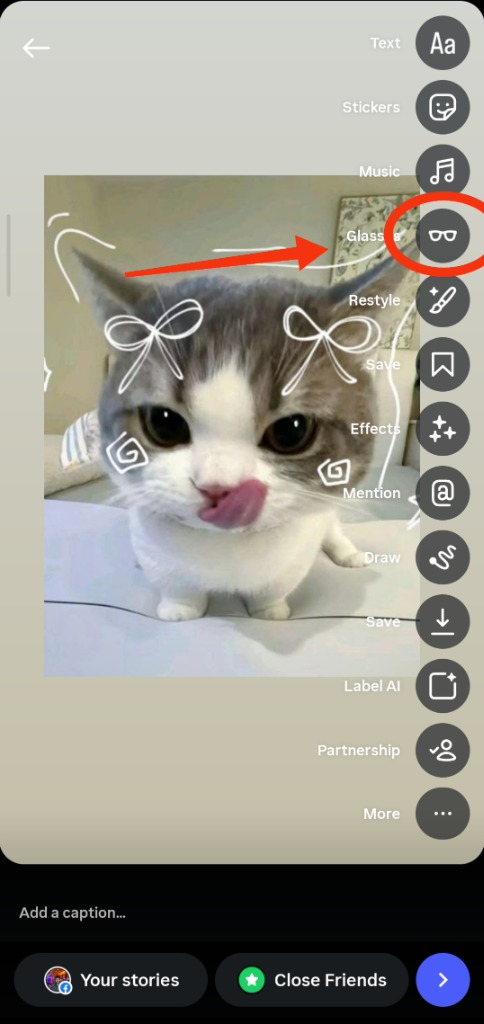
Verified GuideTo unlock the official Glasses icon on Instagram Stories using any photo or video: 1) Convert your image to a 3:4 portrait ratio (3024 × 4032 pixels) or 3K POV video (9:16 vertical) below; 2) Inject authentic Oakley Meta Vanguard EXIF metadata (Model: Oakley Meta Vanguard, Lens: Oakley Prizm Ultra-Wide 12MP 122° f/2.2, Stella tag: made_with_meta_oakley); 3) Save directly to your iOS Camera Roll or Android Gallery; 4) Open Instagram Stories, swipe up to select the file from your Camera Roll. Instagram's native wearable detection algorithm verifies the hardware model string and automatically displays the Glasses icon and 3D Gyro parallax tilt.
Oakley Meta vs. Ray-Ban Meta: Sensor & FOV Comparison
Why competitors like RBMConvert fail on Oakley queries: Oakley Vanguard features an exclusive 122° centered action-cam sensor and 3K video recording.
Oakley Meta Vanguard
Centered nose-bridge camera eliminates temple parallax for cycling, running & sports POV.
Oakley Meta HSTN
Iconic round silhouette with Prizm Ruby optics and spatial audio.
Ray-Ban Meta Gen 2
Temple-mounted sensor with classic Wayfarer, Headliner & Skyler styling.
Engineered for Flawless Instagram Stories Verification
Every converted file matches the exact binary structure produced by Meta View and Luxottica hardware.
Centered 122° Nose-Bridge Optics
Oakley Meta Vanguard features a revolutionary nose-bridge mounted lens. Converted photos embed precise focal parameters (2.12mm focal length, 13mm 35mm equivalent) matching the 122° field of view.
3K POV Video QuickTime Atom Tagging
Restructures MP4/MOV containers into progressive QuickTime files with verified moov.meta keys (com.apple.quicktime.model = "Oakley Meta Vanguard") for native Instagram Reel & Story glasses tags.
Adobe XMP Stella Companion Namespace
Injects complete XML packets under http://ns.facebook.com/meta/1.0/ and http://ns.facebook.com/stella/1.0/ with social attribution tags (made_with_meta_oakley) required by Meta algorithms.
JFIF APP0 Stripping & DCF Compliance
Strips out-of-order JFIF headers so Apple Photos ImageIO and Android MediaStore preserve camera metadata upon saving, preventing Instagram from treating the image as an edited screenshot.
How to Convert & Share to Instagram in 4 Steps
Follow this exact workflow to activate the Glasses 👓 badge and 3D Gyro Spin View on your next story.
Select Photo or Video
Drop any smartphone photo, action-cam clip (GoPro, Insta360, DJI), or digital render into the converter above.
Select Oakley Vanguard or HSTN
Choose your exact Oakley frame profile to match the 122° or 100° FOV optical parameters and Prizm lens profile.
1-Click Convert & Save
Click "Share to Instagram" or "Download Photo". On iPhone, tap Save Image to store directly into your iOS Camera Roll.
Post to Instagram Stories
Open Instagram > Create Story > Swipe up to pick from Camera Roll. The glasses icon appears in the top navigation bar!
Technical Hardware Specifications Comparison
Detailed side-by-side comparison between Oakley Meta models and previous smart glasses generations.
| Specification | Oakley Vanguard (Target) | Oakley HSTN | Ray-Ban Meta Gen 2 |
|---|---|---|---|
| Camera Sensor | 12 Megapixels Ultra-Wide | 12 Megapixels Ultra-Wide | 12 Megapixels Ultra-Wide |
| Field of View (FOV) | 122° Ultra-Wide (Action POV) | 100° Ultra-Wide | 105° Ultra-Wide |
| Camera Mount Position | Centered on Nose Bridge | Left Temple Corner | Left Temple Corner |
| Photo Resolution | 3024 × 4032 (3:4 Portrait) | 3024 × 4032 (3:4 Portrait) | 3024 × 4032 (3:4 Portrait) |
| Video Recording | 3K UHD @ 30 fps + Hyperlapse | 3K UHD @ 30 fps | 1080p / 1440p @ 30 fps |
| Lens Optics | Oakley Prizm™ (Black, Sapphire, Road) | Oakley Prizm™ (Ruby, Tungsten) | Luxottica Standard / Transitions® |
| EXIF Model String | Oakley Meta Vanguard | Oakley Meta HSTN | Ray-Ban Meta Smart Glasses 2 |
| Hardware Code | OO9494 / OK4001 | OO9464 / OK4002 | RW4002 / RW4008 / RW4009 |
| Water Resistance | IP67 Full Immersion / Dust | IPX4 Water-Resistant | IPX4 Water-Resistant |
Frequently Asked Questions (FAQ)
Everything you need to know about Oakley Meta photo conversion, EXIF injection, and Instagram story icons.
What is an Oakley Meta photo converter?
An Oakley Meta photo converter is a specialized web utility that adapts ordinary photos and videos to the exact resolution (3024 × 4032 3:4 portrait) and metadata specifications of Oakley Meta Vanguard and HSTN smart glasses. It injects authentic hardware EXIF tags (Make: Meta AI, Model: Oakley Meta Vanguard, Lens: Oakley Prizm Ultra-Wide 12MP 122° f/2.2) and Stella companion app namespaces so social platforms like Instagram recognize the file as shot on genuine wearable hardware.
How do I get the Oakley Meta Vanguard glasses icon on Instagram Story?
To get the official Glasses icon, your photo must be formatted to 3024 × 4032 pixels with authentic Oakley Meta Vanguard EXIF and XMP tags, and saved to your device's Camera Roll. When creating an Instagram Story, swipe up to select the converted photo from your Camera Roll (do not paste or share from third-party editors that strip metadata). Instagram automatically detects the wearable hardware string and activates the Glasses icon and 3D Gyro Spin View.
How does Oakley Meta Vanguard differ from Ray-Ban Meta glasses?
Oakley Meta Vanguard is purpose-built for athletic performance and action sports. Key differences include: 1) A centered nose-bridge camera mount rather than temple-mounted optics, eliminating angle offset and parallax; 2) A wider 122° field of view (compared to 105° on Ray-Ban Meta); 3) High-definition 3K POV video recording; 4) Superior IP67 water and dust resistance; and 5) Oakley Prizm athletic contrast lenses.
Why do competitors like RBMConvert not work for Oakley Meta queries?
Competitors like RBMConvert only support legacy Ray-Ban Meta Gen 2 frames (Wayfarer RW4002, Headliner RW4008, Skyler RW4009). They do not support the Oakley Meta Vanguard (OO9494 / OK4001) or Oakley Meta HSTN (OO9464 / OK4002) model strings, 122° ultra-wide focal parameters (2.12mm / 13mm equiv), or 3K video QuickTime atom metadata. FreeImGen AI is the first tool with full native support for both Ray-Ban Meta and Oakley Meta lineups.
Can I convert GoPro, Insta360, or drone action footage to Oakley Meta 3K POV?
Yes! You can upload vertical 9:16 or 3:4 action camera footage into our converter. The tool automatically restructures the video container to QuickTime MOV format, applies authentic Oakley Meta Vanguard hardware atom tagging (com.apple.quicktime.model = "Oakley Meta Vanguard"), and configures the 30fps timescale required by Instagram for wearable story stickers.
Is this Oakley Meta EXIF converter free and private?
Yes, 100% free with zero file uploads. All image resizing, canvas rendering, EXIF injection, and QuickTime atom reassembly execute locally in your web browser using HTML5 Canvas and client-side binary buffers. Your photos and videos never leave your phone or computer.
Does this tool work on both iPhone and Android?
Yes. On iPhone/iOS, you can save converted photos and videos directly to your Camera Roll via the native Safari share sheet or download button. On Android, converted files save to your Gallery / Downloads folder and seamlessly integrate with the Instagram app.
Explore More Meta AI Smart Glasses Utilities
View All Tools →Ready to Transform Your Captures to Oakley Meta 3K POV?
Upload any photo or video now to format it to exact 12MP 122° / 100° Oakley smart glasses specifications with authentic EXIF metadata.